Customer-first AML workflow
for designated services
duely onboards each customer once, then attaches their due diligence to every engagement automatically. Risk, enhanced due diligence (ECDD), approval, retention and evidence stay with the engagement that triggered the obligation.
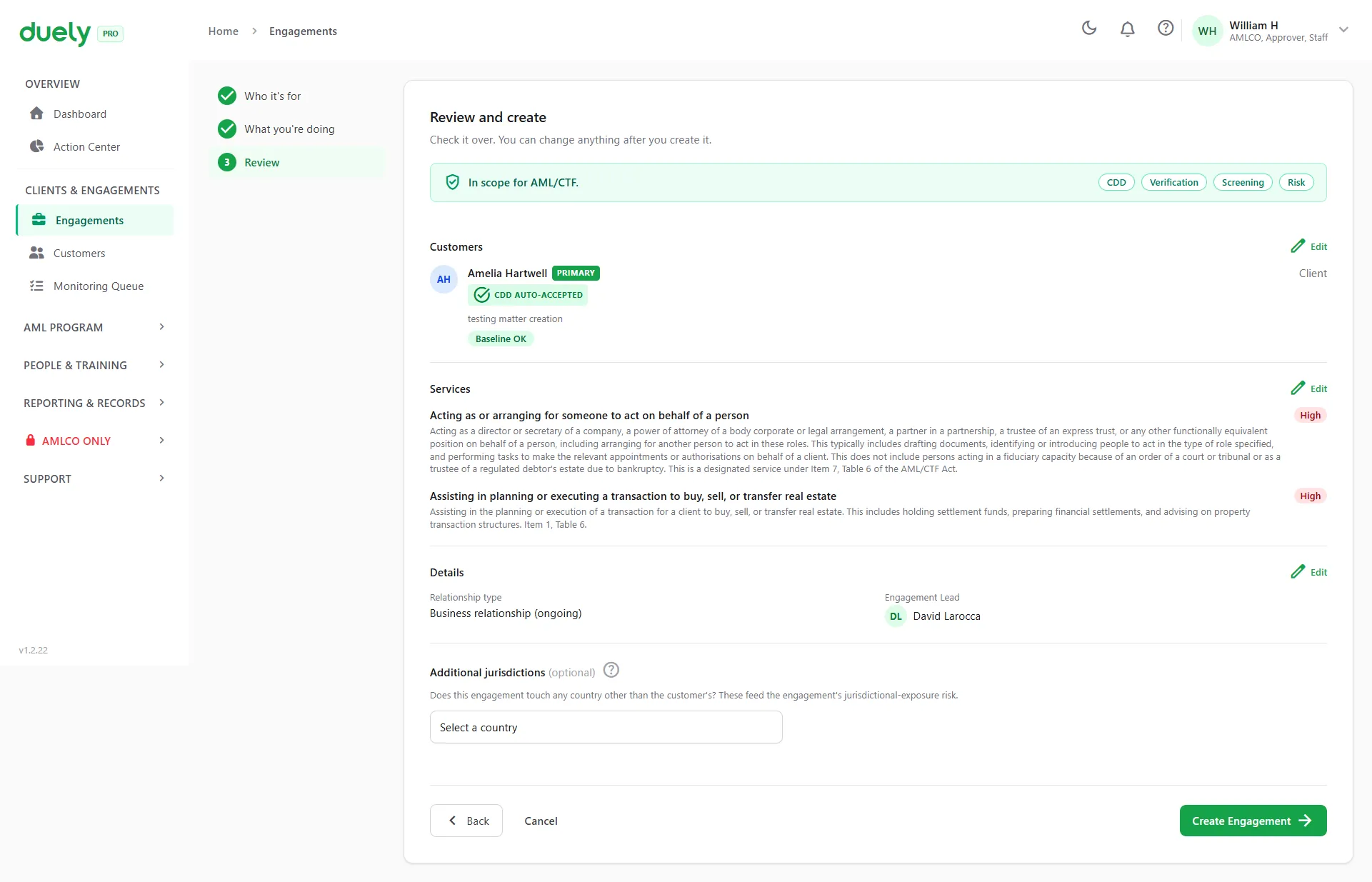
Opening an engagement: the customer's due diligence attaches automatically and the services are chosen from a list. Sample data. See the full walkthrough
Why this matters
Under Tranche 2, one customer can trigger several designated services, and each needs its own risk assessment and evidence. If everything sits in a single customer folder, the compliance record is hard to explain later.
duely gives each engagement its own record with the designated service, linked customers and roles, lifecycle status, due diligence trail, approval history, and retention anchor. When a regulator or auditor asks how a specific engagement was handled, the answer is in the engagement, not scattered across folders.
What's included
Engagement creation and team assignment
Open an engagement (called a transaction, engagement or matter, depending on your sector), assign an owner and team members, and link the customers with their roles.
Services and automatic CDD attachment
Add the services when you open the engagement: designated, non-designated or a mix. If any service is designated, a risk assessment is required. Each customer's existing customer due diligence (CDD) attaches automatically, and you can opt out for any customer.
Multi-party engagements with representatives
Keep every party to an engagement on one record: the primary customer, additional parties, and representatives such as an attorney, solicitor or company signatory, each with their role. Each customer keeps their own due diligence and evidence, and representatives are recorded against the party they act for. In a property sale, every buyer and seller sits on the one engagement.
Notes on customers and engagements
Add notes to a customer's profile or to an engagement, so the context behind a decision sits with the record instead of in someone's inbox.
Customer baseline drift detection
When a customer's beneficial ownership or control structure changes, duely flags the drift on every engagement that uses that customer. Choose Apply, Rebind or Upgrade, with a recorded reason and baseline reference. The engagement never silently runs on stale customer data.
Customer trigger-event history
Every reason a customer's CDD status changed is logged: a risk re-rating, a screening hit, a baseline update or an event on a related engagement. "Why did we re-review this customer?" is answered in one click instead of being reconstructed from email.
Engagement status lifecycle
Status runs from draft and in progress to approved, declined or withdrawn, and concluding an engagement sets its retention date. Every status change is logged in the audit trail.
Retention anchor and 7-year record logic
Concluding an engagement records an end date and a reason as the retention anchor. The law requires records to be kept for 7 years from that anchor, and duely keeps the anchor and its reason on the record.
Firm-wide access, restricted sensitive actions
Anyone in the firm with compliance access can read the firm's engagements. Sensitive actions (suspicious matter reports, sensitive evidence packs, reliance approvals) are restricted by the AML/CTF compliance officer (AMLCO) and Approver policies.
Who can do what
Roles in duely are simple. Staff do the work, an approver decides, and the AMLCO holds the powers that carry the most risk.
| Action | Staff | Approver | AMLCO |
|---|---|---|---|
| Open engagements, add services and customers | Yes | Yes | Yes |
| Run identity verification and screening | Yes | Yes | Yes |
| Complete the risk questionnaire and prepare ECDD actions | Yes | Yes | Yes |
| Approve or decline an engagement | No | Yes | Yes |
| Sign off an ECDD case | No | Yes | Yes |
| Open an ECDD case manually | No | No | Yes |
| Reactivate a declined or withdrawn engagement | No | No | Yes |
| See and handle suspicious matter reports | No | No | Yes |
An approver needs their own training and screening to be current before they can approve. The admin role can also approve and sign off. duely does not stop the person who prepared an ECDD case from signing it, so if you want a second pair of eyes, make it a firm policy.
AML/CTF Act and designated services
- Obligations attach to designated services, not client relationships
- Each engagement that includes a designated service requires CDD and its own risk assessment
- Record-keeping: 7 years from relationship end or service provision
- Engagement-level records make it straightforward to show how each designated service was handled
Related features
Other parts of the compliance workflow this connects to.
Identity Verification
Verify the customers on each engagement by electronic, documentary or manual methods.
See details →Risk Assessment
Assess risk on each engagement with structured questions and escalation to ECDD.
See details →Evidence Packs
Turn engagement activity into a versioned, integrity-hashed evidence pack.
See details →See how an engagement becomes an evidence pack
Follow one engagement from customer onboarding to evidence pack.